Snill.ai Builds Your Internal App. Codehooks Gives It Superpowers.

You described your consulting firm in a sentence and got a working internal app back — clients, projects, time entries, invoices, dashboards, a REST API. That's Snill. Now you mark an invoice as sent and you need something to happen: bill the customer, email them an invoice, update the record when they pay. That's a webhook job — and Codehooks is built for exactly that.
This post introduces Snill to the Codehooks audience, explains why the two fit together so naturally, and walks through a complete example: a Snill trigger fires a signed webhook, Codehooks verifies it and does the real work, then writes the result straight back into your Snill app.
What is Snill, and who makes it?
Snill is a new platform that turns a plain-English description of your business into a complete internal app — a real relational database, dashboards, forms, multi-user access, an auto-generated REST API, and outbound webhooks. No code, no schema files. You describe what you do ("I run a consulting firm; I track clients, projects, time entries, and invoices") and Snill generates the whole system in seconds.
And it stays conversational. Everything in the app can be changed just by chatting with Snill's AI — "add a status field to invoices," "create a dashboard of revenue by client" — no need to edit a schema or open the visual builder unless you want to. The AI and the editor produce the same result; you switch freely, and every change is versioned so you can roll back in one click.
If that lineage feels familiar, it should: Snill is built by Codehooks AS — the same team behind restdb.io and codehooks.io. It's the natural evolution of a decade of work on database tooling: the schema-driven app idea from restdb, rebuilt AI-first on a modern stack. (If you want the backstory, the team wrote it up in Why we're building snill.ai.)
Here's the important part for developers. Snill is deliberately not "vibe coding." The AI never hands you a pile of bespoke code to babysit — it builds a structured app the platform runs and keeps running, and it can only do what the platform actually supports. That's a feature: your system of record stays clean, safe, and predictable. But it also means Snill draws a line. Its built-in automation is declarative — triggers that fire named events and can send a templated email. Anything beyond that — multi-step workflows, external integrations, branching business logic — is intentionally left to you.
That line is exactly where Codehooks begins.
Why are Snill and Codehooks a perfect pair?
Because one produces webhooks and the other is the backend for webhooks. The fit is mechanical, not marketing:
- Snill emits. Record triggers fire on create/update/delete (with conditions like "only when
statusbecomesapproved"), and aggregate triggers fire when a count or sum crosses a threshold ("low-stock-alertwhen products withstock < 10exceeds 5"). Those events are delivered as outbound webhooks: a JSONPOST, HMAC-SHA256 signed with anX-Snill-Signatureheader, with retries on failure. - Codehooks consumes. A Codehooks endpoint is the perfect target — it verifies the signature, then runs whatever logic you want: call Stripe, generate a document, fan out to other systems, enqueue a job, schedule a follow-up.
- Snill receives back. Every Snill app ships a REST API (
https://api.snill.ai/v1/data/{collection}) with scoped API keys, so Codehooks can write results straight back into the app — flip a status, attach a payment URL, create a related record.
The mental model is simple:
Snill = the app — data, dashboards, UI, REST API, triggers. Codehooks = the brain behind the webhooks — logic, integrations, workflows, scheduling. A trigger fires → a signed webhook hits Codehooks → Codehooks writes back via Snill's API.
Snill stays the clean system of record and the interface your team uses every day. Codehooks handles the messy, open-ended real-world logic that no declarative system should try to own.
A complete example: auto-bill an invoice
Let's build the canonical case — the full invoice lifecycle, automated. In a Snill consulting app, invoices have a status of draft → sent → paid. When an operator flips an invoice from draft to sent — the deliberate "bill this now" action — you want Codehooks to create a Stripe invoice and let Stripe email the customer a hosted invoice with a pay button, then store that link back on the Snill record. When the customer pays, you want it flipped to paid automatically — without anyone touching the record. Codehooks handles both webhooks: the one Snill fires, and the one Stripe fires back.
(Why a Stripe invoice and not a payment link? A Stripe Payment Link is just a URL — Stripe never emails it. A Stripe Invoice, sent with collection_method: 'send_invoice', makes Stripe email the customer a hosted invoice page with a pay button and a PDF — so the "email the customer" step is real and you write zero email code.)
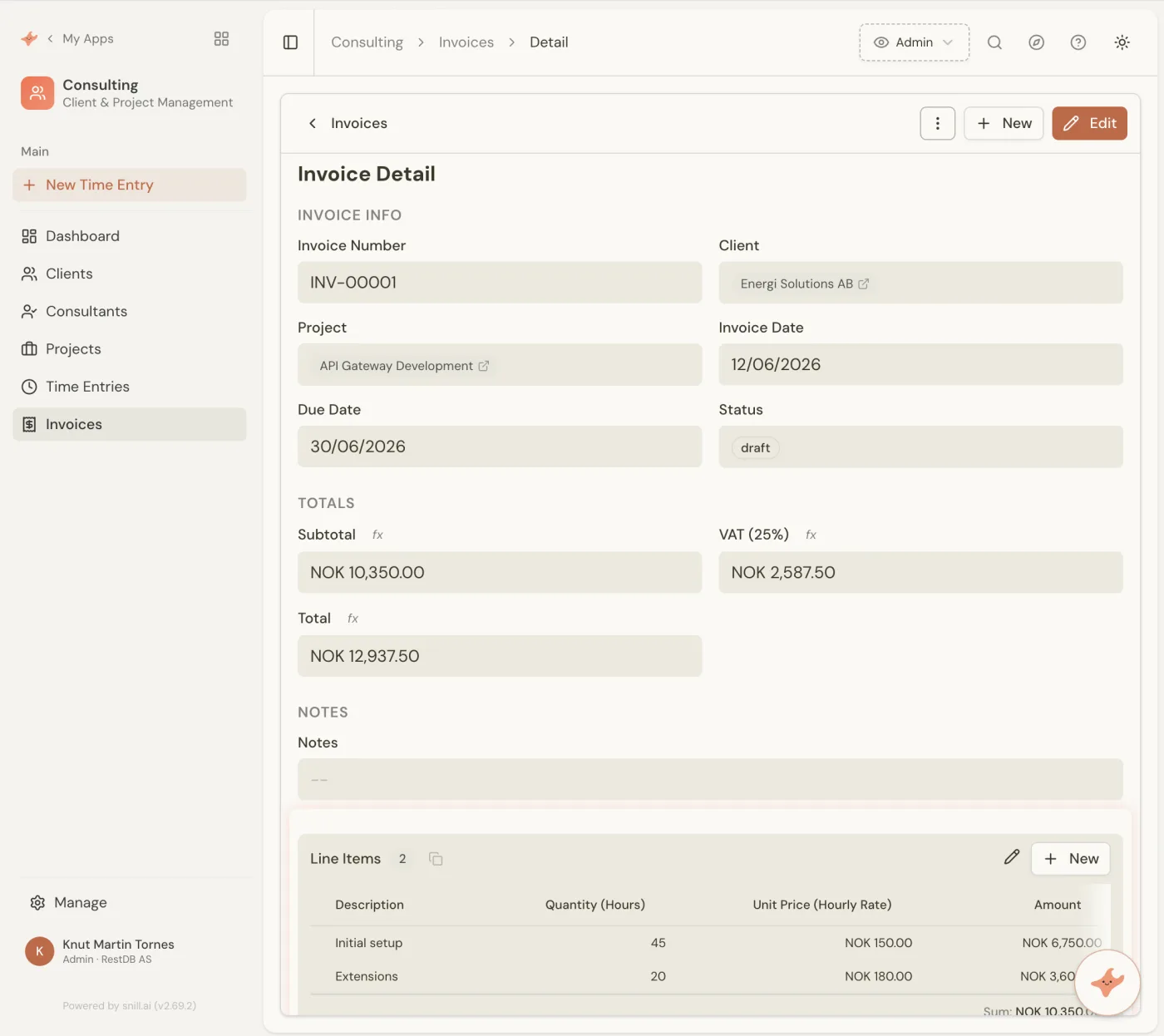
Here's an invoice in the Snill app — a real record with a client, project, calculated totals, and that all-important status field:
Two signed webhooks, both landing on Codehooks; two write-backs to Snill's API. Snill stays the system of record and the UI; Codehooks is the logic in between. Here's how each piece is wired.
Step 1 — Fire a webhook from Snill
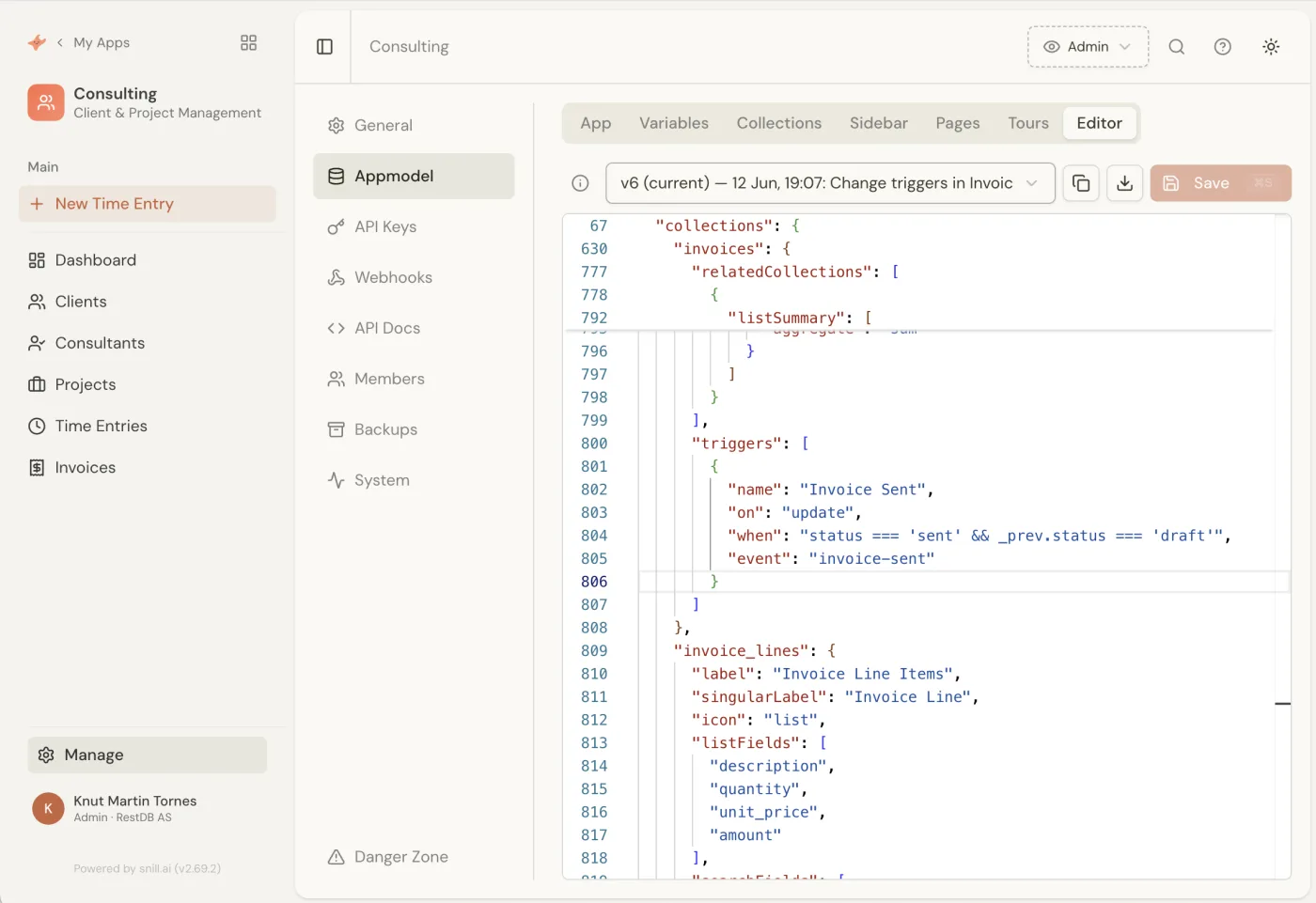
In Snill, you set this up with no code. First, a trigger on the invoices collection that emits an invoice-sent event whenever an invoice's status changes from draft to sent. In Snill's Appmodel that's just a few lines — a record trigger with a condition:
{
  "name": "Invoice Sent",
  "on": "update",
  "when": "status === 'sent' && _prev.status === 'draft'",
  "event": "invoice-sent"
}
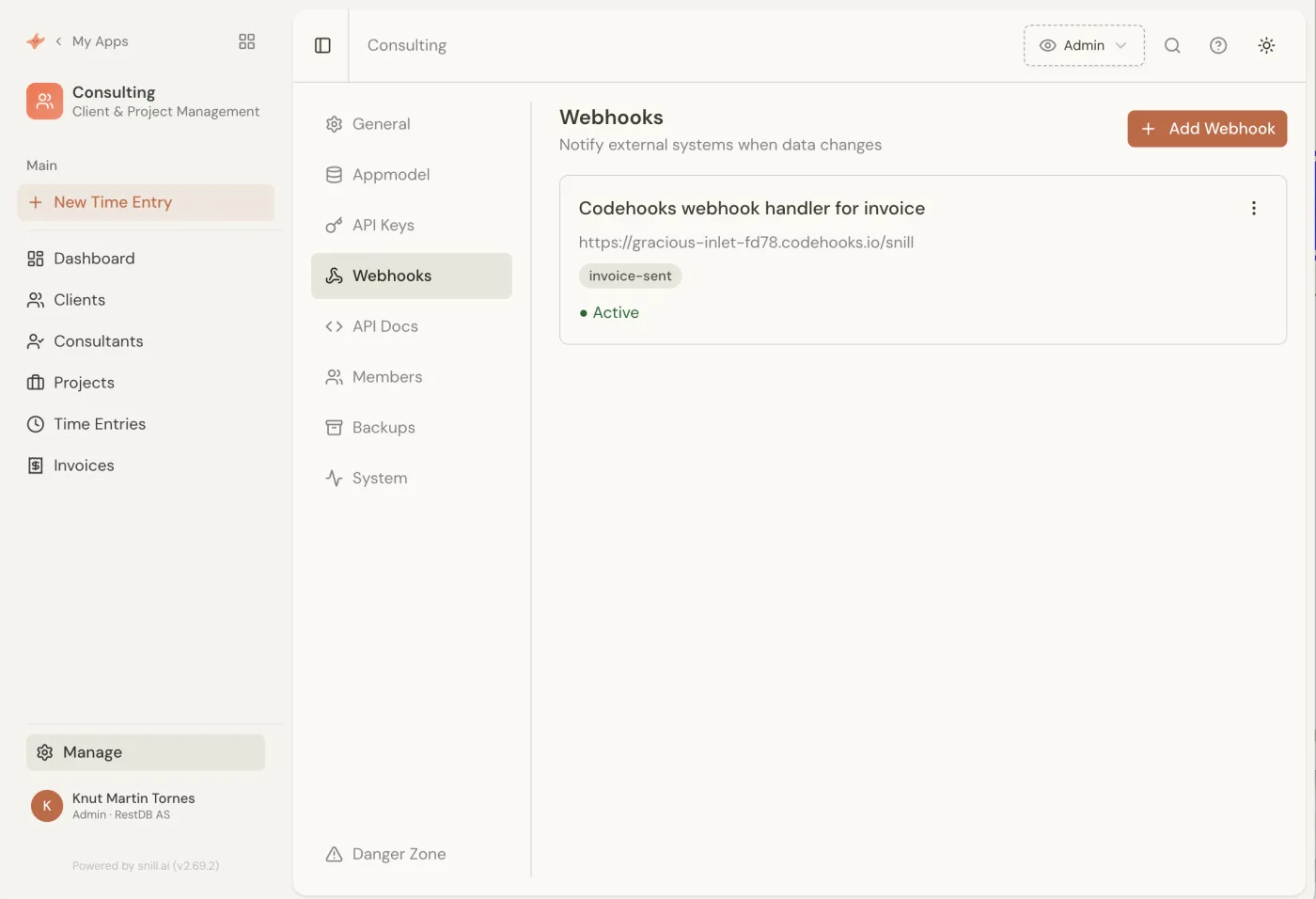
Then a webhook under Manage → Webhooks that listens for that custom invoice-sent event and POSTs to your Codehooks URL. Snill signs every delivery with the webhook's secret.
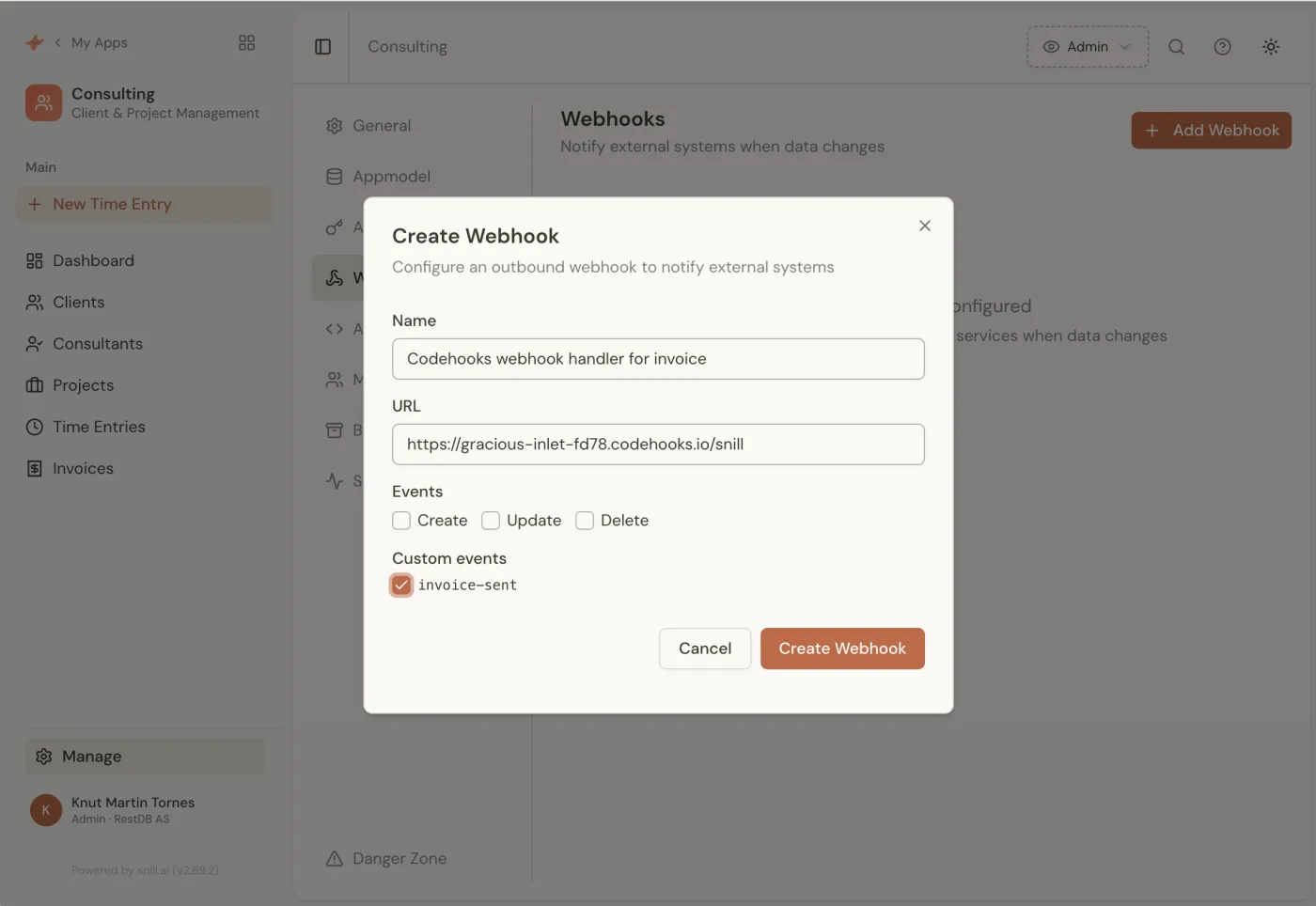
Each delivery is a JSON POST containing the event name, the collection, the current record (and the previous record), and a project identifier — signed as X-Snill-Signature: sha256=…, an HMAC-SHA256 of the raw request body. Once it's saved, the webhook shows as active and ready:
Step 2 — Receive, verify, and act in Codehooks
Here's the Codehooks handler. It verifies the signature against the raw body (never trust an unverified webhook), looks up the customer's email from Snill, creates and sends a Stripe invoice (Stripe emails it), and then writes the hosted invoice URL back onto the record via Snill's REST API.
For the signature check we'll use webhook-verify — a zero-dependency helper published by Codehooks for exactly this job. Its generic hmac.verify() handles the sha256= prefix and the timing-safe comparison for us, so Snill's scheme is a one-liner. Install it with npm install webhook-verify (or skip it and roll the same check by hand with Node's built-in crypto — it's only a few lines).
import { app } from 'codehooks-js';
import { hmac } from 'webhook-verify';
import Stripe from 'stripe';

const stripe = new Stripe(process.env.STRIPE_SECRET_KEY);

// Snill POSTs here when the invoice-sent event fires
app.post('/snill', async (req, res) => {
  // 1. Verify the webhook really came from Snill.
  //    Snill signs X-Snill-Signature: sha256=<HMAC-SHA256 of the raw body>
  const valid = hmac.verify(
    req.rawBody,
    req.headers['x-snill-signature'],
    process.env.SNILL_WEBHOOK_SECRET,
    { algorithm: 'sha256', encoding: 'hex', prefix: 'sha256=' }
  );

  if (!valid) {
    return res.status(401).json({ error: 'Invalid signature' });
  }

  // 2. Snill's payload: { event, collection, record, previous, project }
  if (req.body.event !== 'invoice-sent') {
    return res.status(200).json({ ignored: req.body.event });
  }
  const invoice = req.body.record;

  // 3. The payload's `client` is a lookup ({ company, _id }) with no email,
  //    so fetch the client record from Snill to get the address.
  const snillHeaders = { 'X-API-Key': process.env.SNILL_API_KEY };
  const client = await fetch(
    `https://api.snill.ai/v1/data/clients/${invoice.client._id}`,
    { headers: snillHeaders }
  ).then((r) => r.json());

  // 4. Create a Stripe invoice and let Stripe email it to the customer.
  //    invoice.total is the calculated gross amount (incl. 25% VAT), in NOK.
  const customer = await stripe.customers.create({
    email: client.email,
    name: client.company,
  });

  const stripeInvoice = await stripe.invoices.create({
    customer: customer.id,
    collection_method: 'send_invoice',
    days_until_due: 14,
    // Stash the Snill invoice id so the "paid" webhook can map back to it
    metadata: { snill_invoice_id: invoice._id },
  });

  await stripe.invoiceItems.create({
    customer: customer.id,
    invoice: stripeInvoice.id,
    amount: Math.round(invoice.total * 100), // NOK → øre
    currency: 'nok',
    description: `Invoice ${invoice.invoice_number}`,
  });

  // sendInvoice finalizes the invoice and emails the hosted pay page
  const sent = await stripe.invoices.sendInvoice(stripeInvoice.id);

  // 5. Write the hosted invoice URL back onto the Snill record
  await fetch(`https://api.snill.ai/v1/data/invoices/${invoice._id}`, {
    method: 'PATCH', // Snill uses PATCH for partial updates
    headers: { ...snillHeaders, 'Content-Type': 'application/json' },
    body: JSON.stringify({ payment_url: sent.hosted_invoice_url }),
  });

  res.status(200).json({ received: true });
});

export default app.init();
That's half the loop. An operator marked the invoice sent; Snill fired the event; Codehooks did the work that lives outside Snill's safe boundary — including handing the email off to Stripe; and the PATCH to /v1/data/invoices/{_id} puts the hosted invoice URL right back on the record, where your team sees it in the Snill UI. Want to also drop a row into a payments collection or post to Slack? Just more code in the same handler.
Note:
payment_urlisn't one of Snill's default invoice fields. Adding it takes one sentence — just tell Snill's AI "add a payment link field to invoices" and it's there. (You never have to touch a schema or the visual builder unless you want to; the Appmodel editor and the AI produce the same result.) Snill's API will store an unknown field either way, but giving it a field definition is what makes the link render on the record.
Step 3 — Close the loop: mark it paid when Stripe confirms
An invoice isn't much use until someone pays it. When the customer does, Stripe fires its own webhook — invoice.paid — and Codehooks is just as happy to catch that one and update Snill again. This is the whole point of "the backend for webhooks": Codehooks sits between Snill and Stripe, reconciling events from both so your invoice's status is always current.
Add a second route to the same backend. It verifies Stripe's signature — this time using webhook-verify's built-in stripe provider (same package, different provider, "one API for all your webhooks") — and reads back the snill_invoice_id we stashed in the invoice's metadata:
import { verify } from 'webhook-verify'; // add `verify` to your existing import

// Stripe calls this URL when the invoice is paid
app.post('/stripe/payment', async (req, res) => {
  // Verify the event with webhook-verify's built-in Stripe provider
  const valid = verify(
    'stripe',
    req.rawBody,
    req.headers['stripe-signature'],
    process.env.STRIPE_WEBHOOK_SECRET
  );

  if (!valid) {
    return res.status(400).json({ error: 'Invalid signature' });
  }

  const event = req.body;

  if (event.type === 'invoice.paid') {
    // The invoice object carries the metadata we set when creating it
    const invoiceId = event.data.object.metadata?.snill_invoice_id;

    if (invoiceId) {
      // Flip the Snill invoice to paid
      await fetch(`https://api.snill.ai/v1/data/invoices/${invoiceId}`, {
        method: 'PATCH',
        headers: {
          'Content-Type': 'application/json',
          'X-API-Key': process.env.SNILL_API_KEY,
        },
        body: JSON.stringify({ status: 'paid' }),
      });
    }
  }

  res.status(200).json({ received: true });
});
Point a Stripe webhook at this endpoint (subscribing to invoice.paid), and the lifecycle runs itself end to end: an operator marks an invoice sent in Snill → Codehooks creates and sends a Stripe invoice → Stripe emails the customer → the customer pays → Codehooks flips the invoice to paid. The one human action is the deliberate "send it" click; everything after is automatic, and the two systems never drift.
A few production notes, all standard Codehooks:
- Verify against
req.rawBody, not the parsed body — the HMAC is computed over the exact bytes the sender used, so re-serializingreq.bodywould change the signature. - Keep secrets in environment variables (
SNILL_WEBHOOK_SECRET,SNILL_API_KEY,STRIPE_SECRET_KEY,STRIPE_WEBHOOK_SECRET) — set them withcoho set-env. - Scope the Snill API key to just
{ "clients": ["read"], "invoices": ["update"] }— the handler reads the client's email and updates the invoice, nothing more. - Stripe must be allowed to email. Turn on "Send finalized invoices to customers" in Stripe's billing settings, and note that test mode sends no real emails (it still fires
invoice.sent/invoice.paid, so the rest of the flow is testable). - Return quickly. Snill times out a delivery after ~10 seconds and retries on failure. For slow work, drop the job on a Codehooks queue and respond
200immediately.
Where does this pattern go next?
The invoice flow is one instance of a general pattern: Snill owns the data and the UI; Codehooks owns the logic between systems. The same wiring covers a lot of ground:
- Aggregate alerts → procurement. A
low-stock-alertaggregate trigger hits Codehooks, which checks a supplier API, creates a purchase order, posts to Slack, and writes a new PO record back into Snill. - Approval workflows. An
order-approvedrecord trigger kicks off a multi-step Codehooks workflow — reserve inventory, charge the card, schedule fulfillment — each step retryable. - Scheduled enrichment. A Codehooks cron job reads from Snill's API every morning, enriches records against a third-party service, and writes the results back.
Snill gives non-developers a real internal app without a developer — and if you are a developer, it hands you a production-grade backend with zero boilerplate. Codehooks is the piece that connects that app to the rest of your world. (If you'd rather build the admin app yourself in code, that's the path in Stop Building Admin Applications — same schema-driven idea, your hands on the keyboard.)
Try it
- Build an app in Snill. Describe your business at snill.ai — the free plan is enough to wire up a real webhook. Add a trigger and an outbound webhook from the docs.
- Deploy a Codehooks handler. Point the webhook at a Codehooks endpoint, verify the signature, and write back through the Snill REST API. New to Codehooks? Start with the quickstart.
Snill builds the app. Codehooks gives it superpowers. Same team, two halves of the same idea — and they snap together over a webhook.