Auto-Generate OpenAPI Docs From Your Code

Your API is only as useful as its documentation. Without clear docs, developers waste hours reverse-engineering endpoints, partners struggle to integrate, and AI agents can't understand your API at all.
But writing OpenAPI specs by hand? That's tedious, error-prone, and constantly out of sync with your actual code.
What if your documentation wrote itself?
With the latest codehooks-js update, it does. Define your schemas once, and Codehooks generates complete OpenAPI 3.0 documentation—served as an interactive Swagger UI at /docs.
Why API Documentation Matters
Good API documentation isn't optional—it's the difference between adoption and abandonment:
- Developers need clear examples to integrate quickly
- Partners require accurate specs for their systems
- Customers expect self-service API access
- AI agents (like ChatGPT, Claude, and custom LLMs) need structured specs to call your APIs correctly
The OpenAPI specification has become the industry standard. It powers Swagger UI, Postman, and countless code generators. But maintaining it manually creates a constant documentation burden.
The DRY Approach
DRY (Don't Repeat Yourself) means defining things once and reusing them everywhere. The best documentation comes from your code itself. With Codehooks, you focus on what matters:
- Define your schemas (using Zod, Yup, or JSON Schema)
- Create your API routes
- Deploy
That's it. Codehooks handles the OpenAPI generation automatically.
Quick Start: Crudlify + Schemas
The fastest path to documented APIs is crudlify. Define a schema, and you get full CRUD endpoints with complete OpenAPI docs:
import { app } from 'codehooks-js';
import { z } from 'zod';

// Define your schema once
const todoSchema = z.object({
  title: z.string().min(1).max(200).describe('Task title'),
  completed: z.boolean().default(false).describe('Completion status'),
  priority: z.enum(['low', 'medium', 'high']).default('medium')
});

// Enable OpenAPI documentation
app.openapi({
  info: {
    title: 'Todo API',
    version: '1.0.0',
    description: 'A simple task management API'
  }
});

// Generate CRUD endpoints with validation and docs
app.crudlify({ todos: todoSchema });

export default app.init();
Deploy with coho deploy, then visit:
/docs— Interactive Swagger UI/openapi.json— Raw OpenAPI specification
You now have 8 fully documented endpoints:
| Method | Path | Operation |
|---|---|---|
| POST | /todos | Create todo |
| GET | /todos | List todos |
| GET | /todos/{ID} | Get by ID |
| PUT | /todos/{ID} | Replace |
| PATCH | /todos/{ID} | Update |
| DELETE | /todos/{ID} | Delete |
| PATCH | /todos/_byquery | Batch update |
| DELETE | /todos/_byquery | Batch delete |
Each endpoint includes request/response schemas, validation rules, and examples—all generated from your Zod schema.
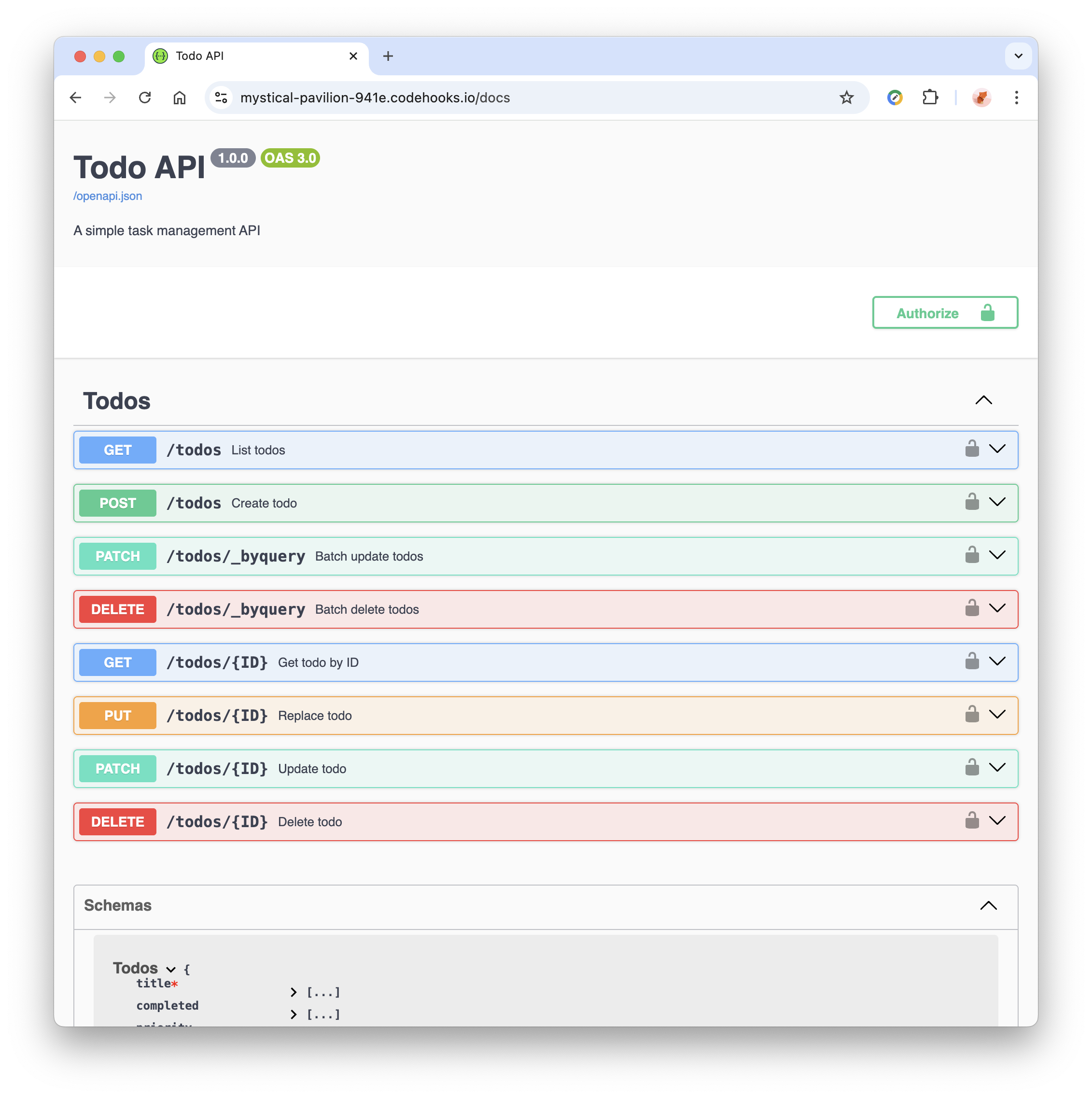 Example: Auto-generated Swagger UI for the Todo API with all CRUD endpoints documented
The generated Swagger UI is fully functional—not just documentation. Enter your API token in the authorize dialog, and you can test all endpoints directly from the browser.
Custom Routes with OpenAPI Specs
Not everything fits the CRUD pattern. For custom endpoints, use the openapi() middleware helper:
import { app, openapi } from 'codehooks-js';

app.get('/health',
  openapi({
    summary: 'Health check',
    tags: ['System'],
    responses: {
      200: { description: 'Service is healthy' }
    }
  }),
  (req, res) => {
    res.json({ status: 'ok', timestamp: new Date().toISOString() });
  }
);

app.post('/analyze',
  openapi({
    summary: 'Analyze text',
    tags: ['AI'],
    requestBody: {
      required: true,
      content: {
        'application/json': {
          schema: {
            type: 'object',
            required: ['text'],
            properties: {
              text: { type: 'string', maxLength: 10000 },
              language: { type: 'string', default: 'en' }
            }
          }
        }
      }
    },
    responses: {
      200: { description: 'Analysis complete' },
      400: { description: 'Invalid input' }
    }
  }),
  async (req, res) => {
    // Your analysis logic
  }
);
The openapi() middleware attaches OpenAPI metadata to your route without affecting its behavior. Your documentation stays next to your code—always in sync.
Using Zod Schemas in Custom Routes
For the best DRY experience, use your Zod schemas directly in custom routes:
import { app, Datastore, openapi } from 'codehooks-js';
import { z } from 'zod';

const UserSchema = z.object({
  name: z.string().min(1).max(100).describe('Full name'),
  email: z.string().email().describe('Email address'),
  role: z.enum(['admin', 'user']).default('user')
});

// Validation middleware
function validate(schema) {
  return async (req, res, next) => {
    try {
      req.body = schema.parse(req.body);
      next();
    } catch (error) {
      res.status(400).json({
        error: 'Validation failed',
        details: error.issues
      });
    }
  };
}

// Schema used for BOTH validation AND OpenAPI docs
app.post('/users',
  openapi({
    summary: 'Create user',
    tags: ['Users'],
    requestBody: {
      required: true,
      content: {
        'application/json': {
          schema: UserSchema  // Zod schema auto-converts to JSON Schema
        }
      }
    },
    responses: {
      201: { description: 'User created' },
      400: { description: 'Validation error' }
    }
  }),
  validate(UserSchema),
  async (req, res) => {
    const db = await Datastore.open();
    const user = await db.insertOne('users', req.body);
    res.status(201).json(user);
  }
);
One schema. Validation and documentation. No duplication.
Advanced Configuration
For production APIs, you'll want more control:
app.openapi({
  info: {
    title: 'Production API',
    version: '2.0.0',
    description: 'Full-featured API with authentication'
  },

  // Multiple environments
  servers: [
    { url: 'https://myapi.api.codehooks.io/dev', description: 'Development' },
    { url: 'https://myapi.api.codehooks.io/prod', description: 'Production' }
  ],

  // Organize endpoints
  tags: [
    { name: 'Users', description: 'User management' },
    { name: 'Orders', description: 'Order processing' },
    { name: 'System', description: 'Health and status' }
  ],

  // Filter what appears in docs
  filter: (op) => {
    // Hide internal endpoints
    if (op.path.startsWith('/internal')) return false;
    // Hide batch delete (dangerous)
    if (op.method === 'delete' && op.path.includes('_byquery')) return false;
    return true;
  },

  // Link to external docs
  externalDocs: {
    description: 'Full API Guide',
    url: 'https://docs.mycompany.com/api'
  }
}, '/api-docs');  // Custom Swagger UI path
Filtering Operations
The filter function gives you precise control over what appears in your documentation:
// Only show public endpoints
filter: (op) => op.tags.includes('Public')

// Hide all DELETE operations
filter: (op) => op.method !== 'delete'

// Exclude admin routes
filter: (op) => !op.path.startsWith('/admin')
Schema Support
Codehooks supports the three most popular schema libraries:
Zod
const schema = z.object({
  email: z.string().email(),
  age: z.number().min(0).max(150).optional()
});
Yup
const schema = yup.object({
  email: yup.string().email().required(),
  age: yup.number().min(0).max(150)
});
JSON Schema
const schema = {
  type: 'object',
  required: ['email'],
  properties: {
    email: { type: 'string', format: 'email' },
    age: { type: 'integer', minimum: 0, maximum: 150 }
  }
};
All three automatically convert to OpenAPI-compatible JSON Schema in your documentation.
Full Example
Here's a complete API with multiple collections, custom endpoints, and full OpenAPI configuration:
import { app, Datastore, openapi } from 'codehooks-js';
import { z } from 'zod';

// Schemas
const productSchema = z.object({
  name: z.string().min(1).max(200),
  price: z.number().positive(),
  category: z.enum(['electronics', 'clothing', 'books']),
  inStock: z.boolean().default(true)
});

const orderSchema = z.object({
  productId: z.string(),
  quantity: z.number().int().positive(),
  status: z.enum(['pending', 'shipped', 'delivered']).default('pending')
});

// OpenAPI config
app.openapi({
  info: {
    title: 'E-Commerce API',
    version: '1.0.0',
    description: 'Product catalog and order management'
  },
  tags: [
    { name: 'Products', description: 'Product catalog' },
    { name: 'Orders', description: 'Order management' },
    { name: 'Analytics', description: 'Business insights' }
  ],
  filter: (op) => !op.path.includes('_byquery')
});

// Custom analytics endpoint
app.get('/analytics/sales',
  openapi({
    summary: 'Get sales summary',
    tags: ['Analytics'],
    parameters: [
      { name: 'period', in: 'query', schema: { type: 'string', enum: ['day', 'week', 'month'] } }
    ],
    responses: {
      200: { description: 'Sales data' }
    }
  }),
  async (req, res) => {
    const db = await Datastore.open();
    const orders = await db.getMany('orders', { status: 'delivered' }).toArray();
    res.json({
      totalOrders: orders.length,
      period: req.query.period || 'all'
    });
  }
);

// Auto-generate CRUD for both collections
app.crudlify({
  products: productSchema,
  orders: orderSchema
});

export default app.init();
Deploy and visit /docs to explore your complete, interactive API documentation.
Summary
Stop treating documentation as an afterthought. With Codehooks OpenAPI support:
- Define schemas once — validation and docs from the same source
- Use crudlify — get 8 documented endpoints per collection instantly
- Add custom routes — the
openapi()middleware keeps specs next to code - Filter and configure — control exactly what appears in your docs
- Deploy and share — Swagger UI at
/docs, spec at/openapi.json
Your API consumers—whether developers, partners, or AI agents—will thank you.
Get started:
npm install codehooks-js@latest
Then add app.openapi() to your project and deploy. Your documentation is ready.
For the complete API reference, see the OpenAPI Documentation guide.
OpenAPI Documentation FAQ
Common questions about auto-generating API docs with Codehooks
What schema libraries are supported?
How do I add descriptions to my API fields?
.describe('Your description'). For Yup, use .meta({ description: 'Your description' }). For JSON Schema, add a description property directly. These descriptions appear in your Swagger UI documentation.Can I test authenticated endpoints in Swagger UI?
How do I hide certain endpoints from the documentation?
filter function in your app.openapi() config. For example: filter: (op) => op.method !== 'delete' hides all DELETE endpoints, or filter: (op) => !op.path.startsWith('/internal') hides internal routes.Can I customize the Swagger UI path?
app.openapi(): app.openapi({ info: {...} }, '/api-docs'). The Swagger UI will be available at /api-docs instead of the default /docs.Do I need to write OpenAPI specs manually for crudlify endpoints?
app.crudlify() with a schema, all 8 CRUD endpoints are automatically documented with proper request/response schemas, validation rules, and examples.How do I document custom routes that aren't part of crudlify?
openapi() middleware: app.get('/custom', openapi({ summary: '...', responses: {...} }), handler). You can pass Zod schemas directly to requestBody for automatic schema conversion.Can AI agents use my OpenAPI documentation?
/openapi.json endpoint provides a machine-readable spec that AI agents, code generators, and API clients can use to understand and interact with your API automatically.Further Reading
- OpenAPI Specification — The official OpenAPI 3.0 specification
- Swagger UI — Interactive API documentation from OpenAPI specs
- Zod Documentation — TypeScript-first schema validation
- JSON Schema — Getting started with JSON Schema
- Codehooks REST API Routing — Learn more about creating API routes
- Codehooks Quickstart — Get up and running with Codehooks